New features, improvements and fixes, every week. Newest first.
9:10 pmImprovedOrders
The orders page loads faster and its summary shows straight away
The summary at the top of the orders page is now part of the page, and one slow background count is gone, so the page is quicker to open.
What's new
Faster to open: one background count across every eBay and Amazon order no longer runs on each visit.
No jumping: the summary, the Views and Actions menus and the search switch are in place as soon as the page shows.
Search all tabs: the results now open below the toolbar instead of squeezing it.
Where to find it
Orders
7:20 pmImprovedOrders
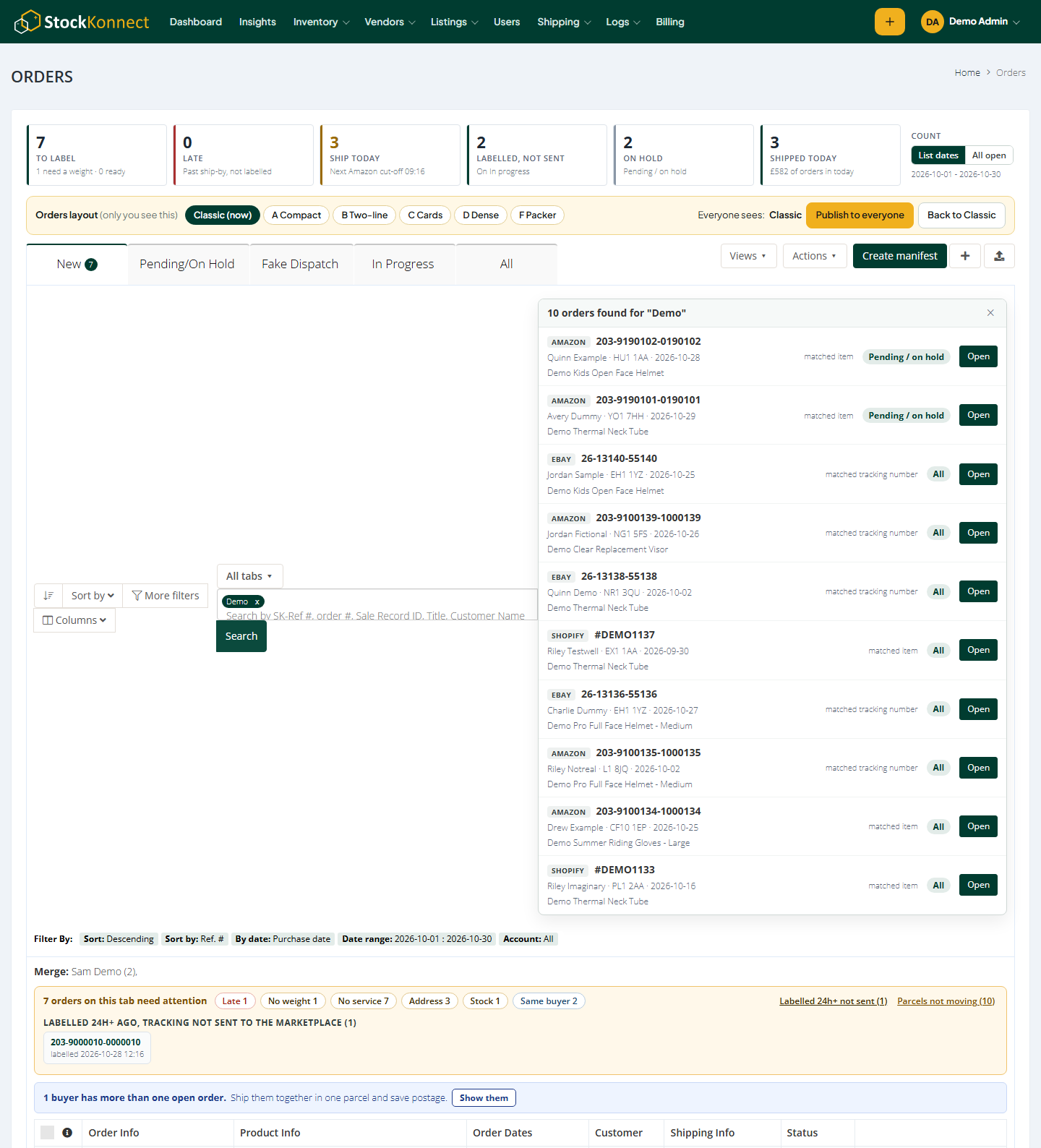
A tidier orders page: one summary, a needs-attention bar and one search
The top of the orders page is simpler: one row of numbers instead of two, problems shown on the tab you are on, and one search box that can look in every tab.
The new top of the orders page.
What's new
One summary strip: to label, late, ship today, labelled not sent, on hold and shipped today - all counted the same way. Switch between the list's dates and every open order.
Needs attention bar: late, no weight, no service, address, stock and same-buyer orders as chips above the list on any tab. Click a chip to see only those orders.
Views menu: your saved views and "Save current view" in one menu.
One search box: choose This tab or All tabs on the left of it.
Actions menu: print, create shipments and export to CSV (ticked orders or the whole tab).
Where to find it
Orders
1:10 pmImprovedInsights
Faster Insights for Shopify and Amazon refunds
Insights reports that read Shopify order lines and Amazon refunds now load faster.
Where to find it
Insights
12:30 pmNewInsights
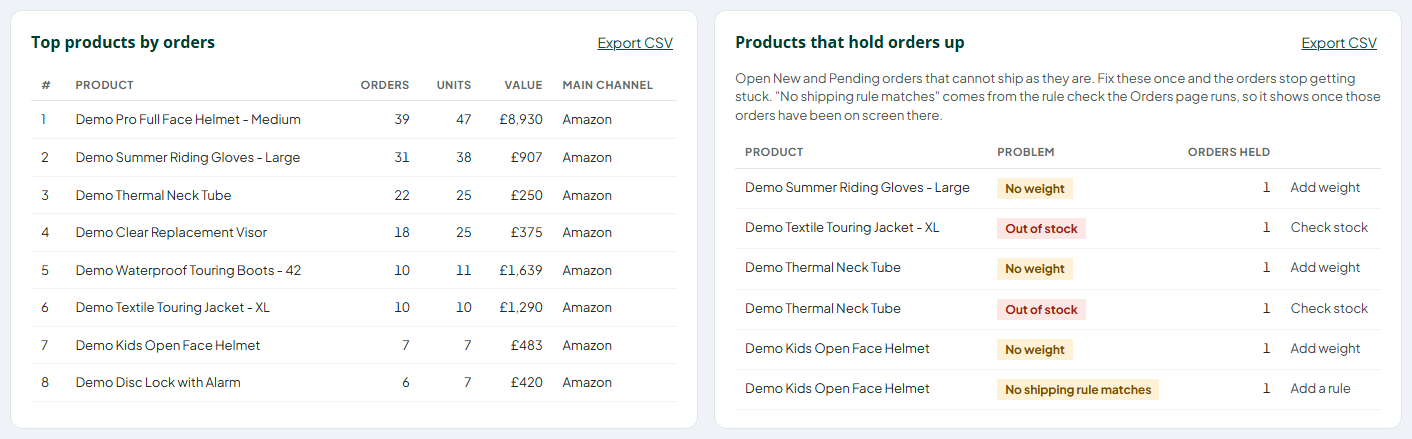
See which products no shipping rule can place
Products that hold orders up now include open orders your shipping rules could not place, with a link straight to the rules.
Products holding orders up, including no matching shipping rule.
What's new
From the real rule check: the Orders page already asks your shipping rules about every order; those answers are now kept.
Per product: see which products keep landing without a courier and service.
One fix: add or widen a rule once and those orders move on.
Where to find it
Insights > Destinations & products > Products that hold orders up
11:40 amImprovedInsights
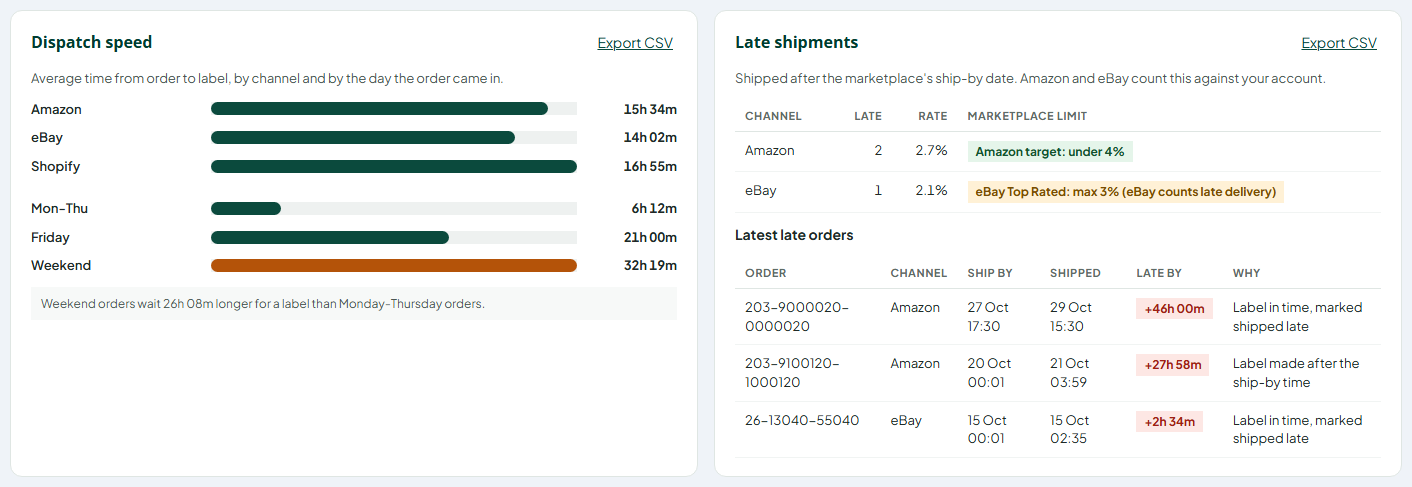
Late shipments now show the eBay Top Rated limit
Next to your eBay late rate you now see eBay's Top Rated limit - no more than 3% of transactions delivered late - so you know how close you are.
Late shipments per channel with the Amazon and eBay limits.
What's new
eBay Top Rated limit: no more than 5 late deliveries or 3% of transactions.
Colour coded: green under 2%, amber from 2%, red from 3%.
Good to know: eBay counts late delivery; this report counts late dispatch, the part you control.
Where to find it
Insights > Overview > Late shipments
10:15 amFixedOrders
Export box opens only when asked
The "Export this tab" box no longer sits open over the order list when the page loads - it opens when you click Export CSV and closes when you click away.
Where to find it
Orders > Export CSV
7:05 pmNewInsights
Export any report or order list to CSV
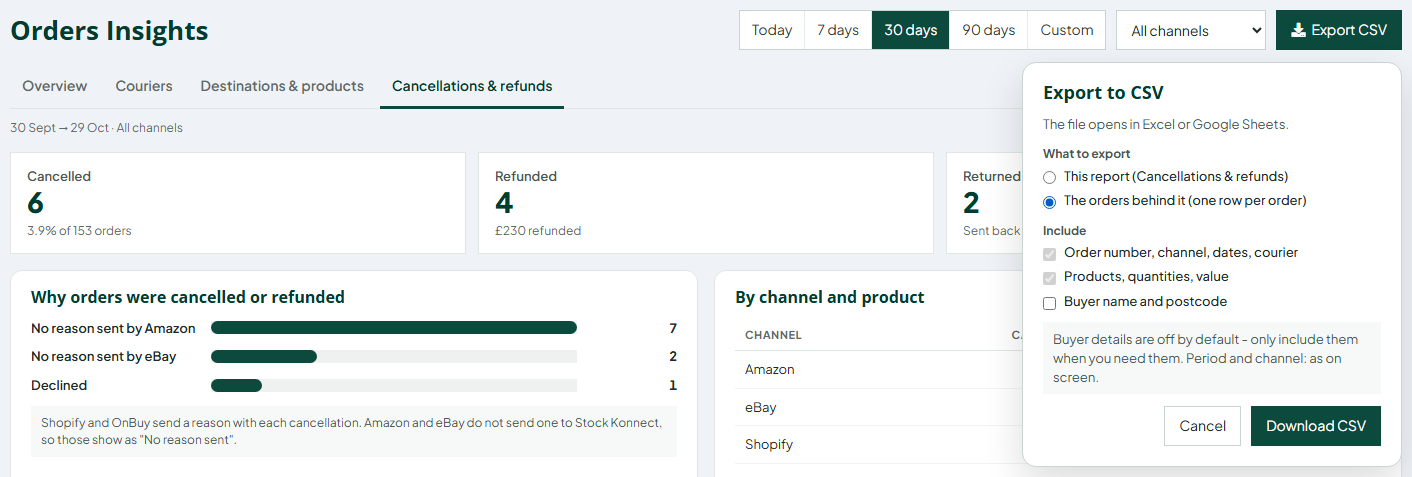
Download any Insights report, the orders behind it, or the orders on any Orders tab as a CSV file for Excel or Google Sheets.
Export to CSV: this report or the orders behind it.
What's new
Every report: the figures on screen, for the period and channel you picked.
The orders behind it: one row per order with dates, status, courier, tracking, items and value.
Orders page: Export CSV next to Search all tabs downloads the tab on screen.
Buyer details off by default: tick the box only when you need names and postcodes.
Where to find it
Insights > Export CSV, and Orders > Export CSV
6:45 pmNewInsights
Cancellations and refunds in one report
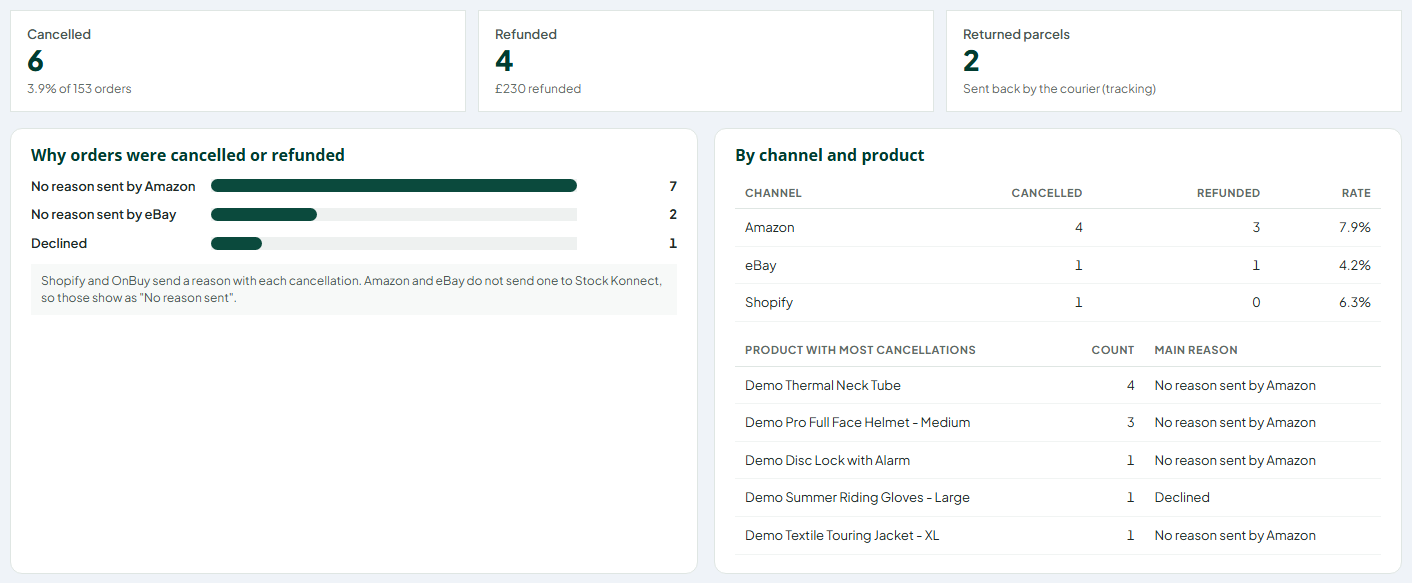
How many orders were cancelled or refunded, why, on which channel and for which products, plus parcels the courier sent back.
Cancellations and refunds with reasons, by channel and product.
What's new
Totals: cancelled, refunded (with the amount) and parcels returned to sender.
Reasons: the reason Shopify and OnBuy send with each cancellation.
By channel and product: rates per channel and the products cancelled most.
Where to find it
Insights > Cancellations & refunds
6:20 pmNewInsights
Products that hold orders up
A list of the products stopping open orders from shipping - no weight, out of stock or not linked to a product - with a link to fix each one.
Top products and the products holding orders up.
What's new
No weight: the product has no weight, so a label cannot be bought.
Out of stock / not enough stock: fewer in stock than the order needs.
Not linked to a product: the channel SKU is not mapped yet.
Fix once: every open order with that product moves on.
Where to find it
Insights > Destinations & products
6:00 pmNewInsights
Where your orders go, and your top products
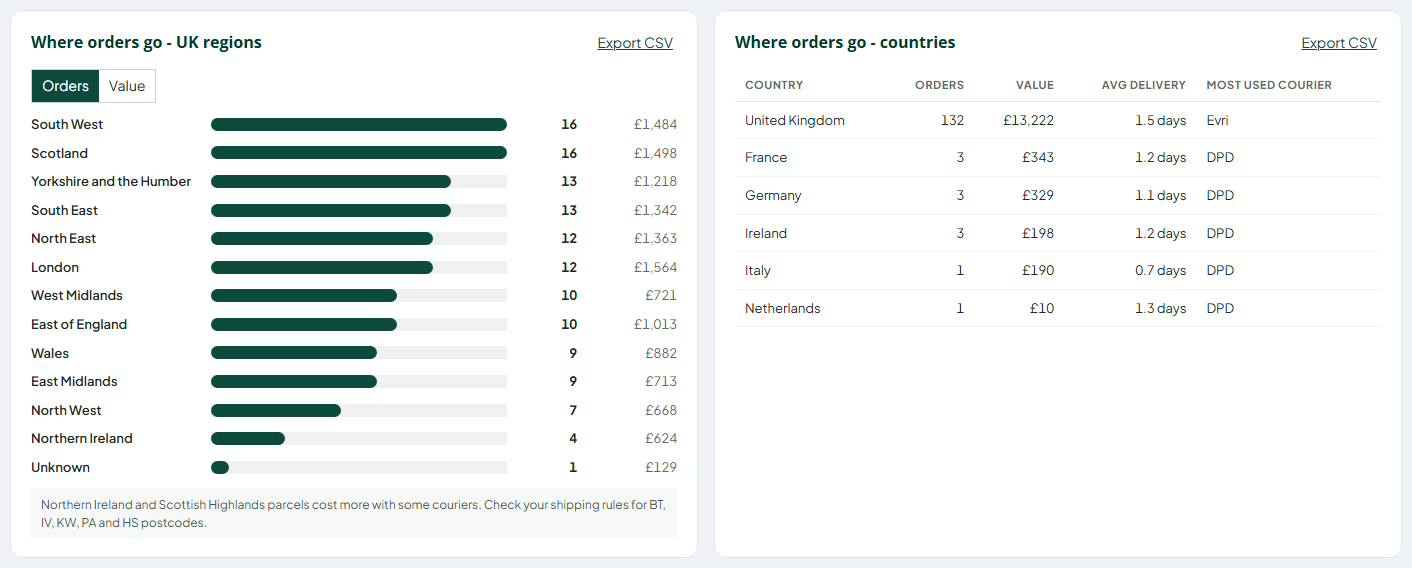
See orders and value by UK region and by country, with average delivery time and the courier you use most, plus your best-selling products.
Orders by UK region and by country.
What's new
UK regions: orders or value per region, from the delivery postcode.
Countries: orders, value, average delivery days and most used courier.
Top products: orders, units and value, with the channel each sells on most.
Where to find it
Insights > Destinations & products
5:35 pmNewInsights
Courier scorecard: how each courier really performs
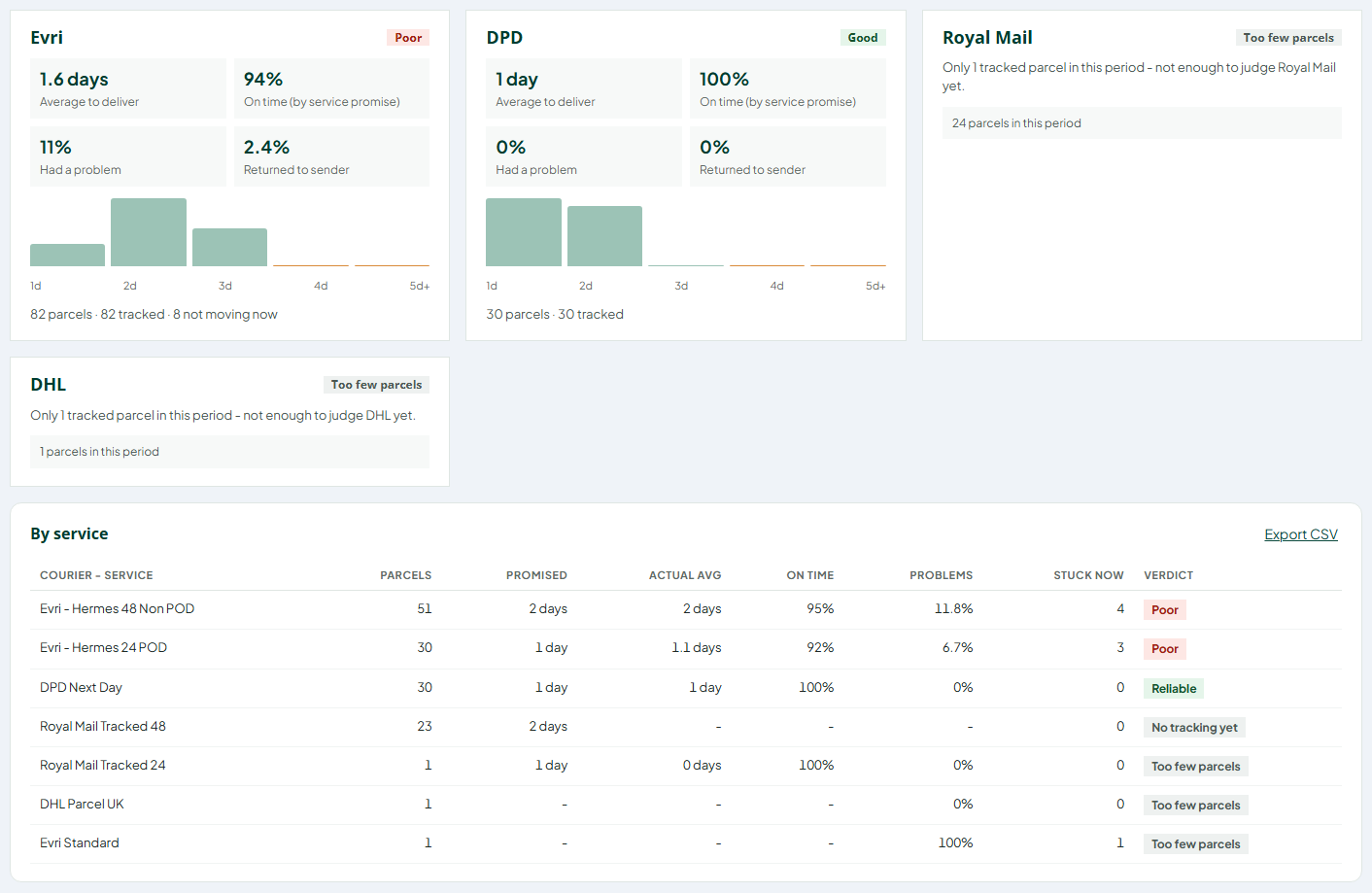
Built from parcel tracking: average days to deliver, on time against the service promise, problems and parcels sent back, per courier and per service.
Courier cards and the by-service table.
What's new
One card per courier: average days to deliver, on time, problems and returns, with a days-to-deliver chart.
By service: promised against actual for every service you use, with a plain verdict.
Where problems happen: flags postcode areas where a courier has far more problems than usual.
Needs tracking: couriers without tracking access show parcel counts until tracking is switched on.
Where to find it
Insights > Couriers
5:10 pmNewInsights
Orders Insights: daily dispatch, dispatch speed and late shipments
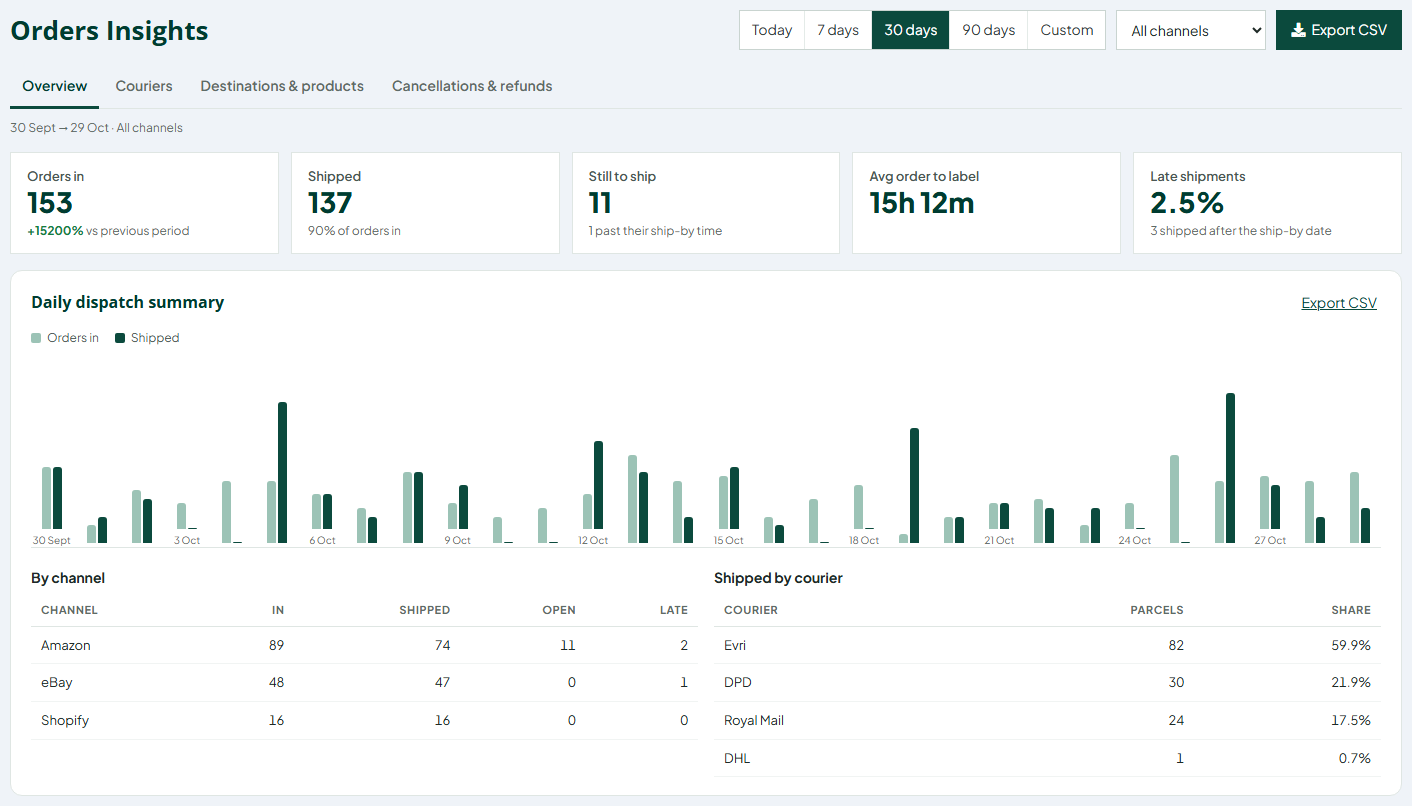
A new Insights menu shows orders in against orders shipped every day, how long orders wait for a label, and how many shipped after the marketplace ship-by date.
Orders in against shipped per day, with the key figures for the period.
What's new
Daily dispatch summary: orders in and shipped per day, by channel and by courier.
Dispatch speed: average time from order to label, by channel and by the day the order came in - spot the slow days.
Late shipments: your late rate per channel next to the Amazon target (under 4%), and the latest late orders with the reason.
Any period: today, 7, 30 or 90 days or your own dates, for all channels or one.
Where to find it
Insights > Overview
3:45 pmFixedOrders
Address check and ship-by countdown fixes
The address check now also flags bad postcodes and missing house numbers when the buyer left a phone number, and shipped orders no longer show a "Late" countdown.
What's new
Address check: invalid UK postcodes and addresses with no house number are flagged again on orders that include the buyer's phone number.
Countdown: shipped, cancelled and refunded orders on the All tab no longer show Late or Ship today.
Where to find it
Orders > any order row
2:30 pmNewUpdates
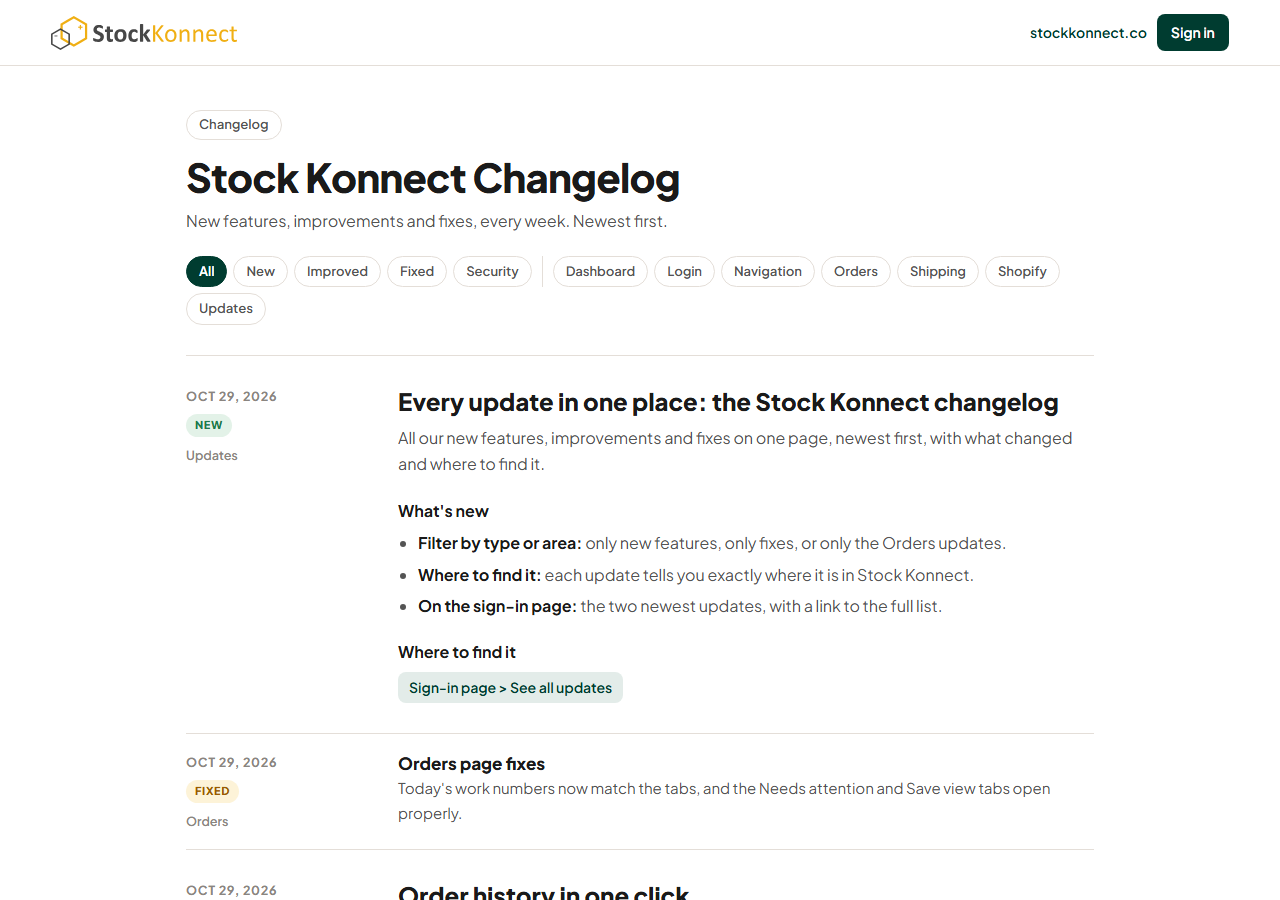
Every update in one place: the Stock Konnect changelog
All our new features, improvements and fixes on one page, newest first, with what changed and where to find it.
The Stock Konnect changelog.
What's new
Filter by type or area: only new features, only fixes, or only the Orders updates.
Where to find it: each update tells you exactly where it is in Stock Konnect.
On the sign-in page: the two newest updates, with a link to the full list.
Where to find it
Sign-in page > See all updates
1:40 pmFixedOrders
Orders page fixes
Today's work numbers now match the tabs, and the Needs attention and Save view tabs open properly.
12:55 pmNewOrders
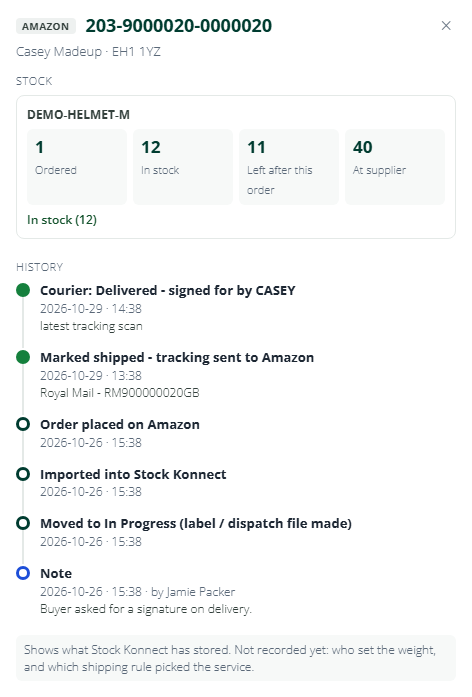
Order history in one click
See who bought the label, when tracking was sent, notes and the latest courier scan - all in one panel.
Stock, label, tracking, notes and the latest courier scan for one order.
What's new
Everything in one panel: when the order arrived, who bought the label, when tracking was sent to the marketplace.
Notes and courier scans: your notes and the latest tracking event, in date order.
Where to find it
Orders > History on an order
12:25 pmNewOrders
Saved views and keyboard shortcuts
Save your filters as your own tab, share it with the team, and work faster with shortcuts - press ? on the orders page.
Save the current filters as your own tab, and share it with the team.
What's new
Your own tabs: save the filters you use every day, up to 20 views each.
Share with your team: shared views show for everyone; only you can change or delete yours.
Live counts: each view shows how many orders match.
Shortcuts: press ? on the orders page to see them all.
Where to find it
Orders > + Save view
11:50 amNewOrders
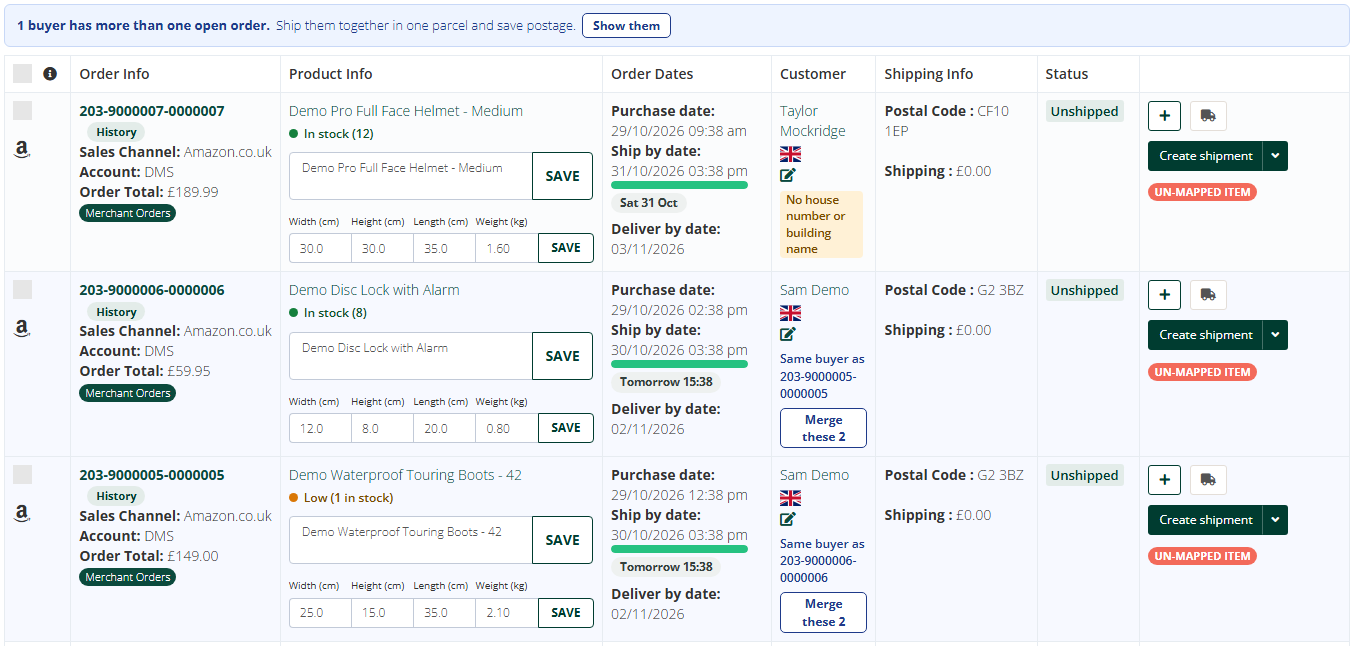
Same-buyer merge suggestions
Two open orders from one buyer? Stock Konnect spots them and merges them in one click so they ship as one parcel.
Two open orders from the same buyer, with Merge these 2.
What's new
Spotted for you: two or more open orders from the same buyer to the same address.
One click to merge: confirm and they ship as one parcel, with one label.
Where to find it
Orders > the merge suggestion on the order row
11:15 amNewOrders
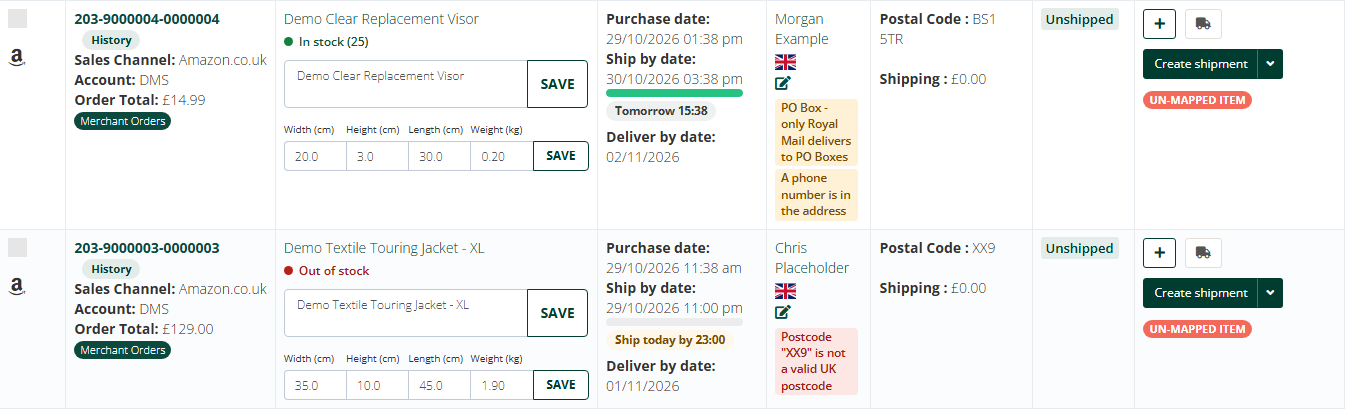
Address check before you buy a label
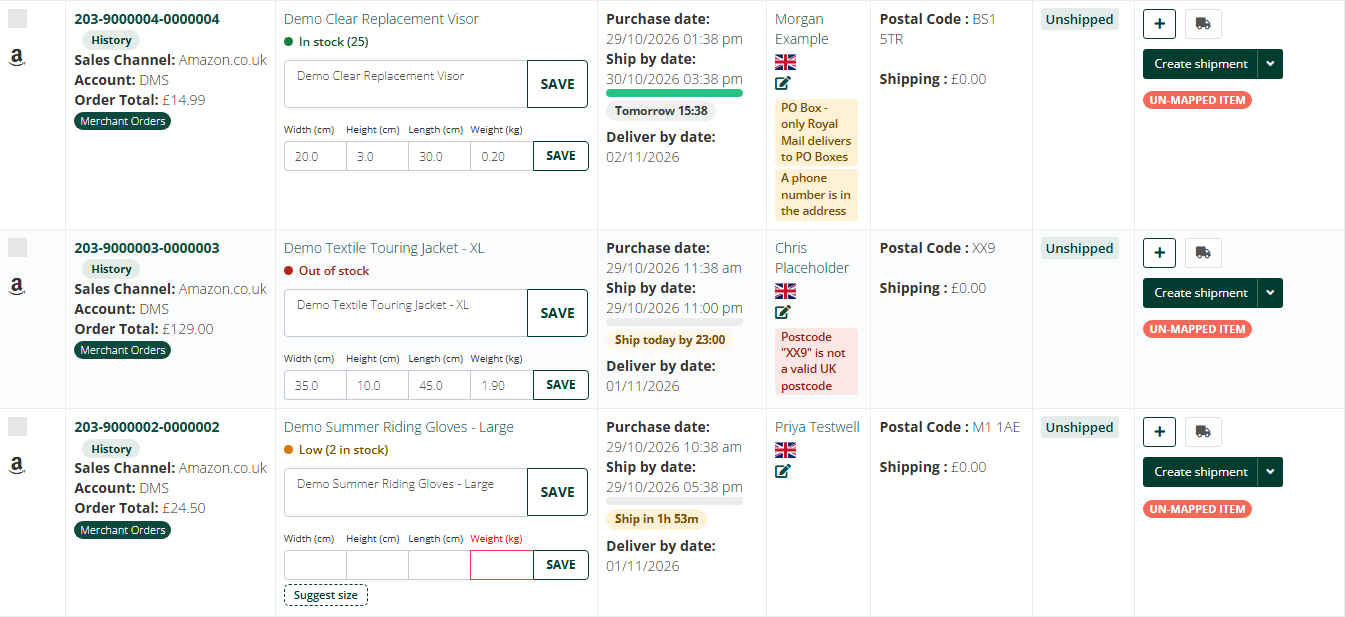
Bad postcodes, missing house numbers, PO Boxes your courier can't deliver to and phone numbers in the address are flagged before you pay for a label.
PO Box, phone number in the address and an invalid postcode, flagged before a label is bought.
What's new
Bad postcodes: postcodes that do not look right are flagged.
Missing house numbers: addresses with no number or house name.
PO Boxes: flagged when your courier cannot deliver to them.
Phone numbers in the address: spotted before they end up on the label.
Advice only: nothing is changed for you; you decide.
Where to find it
Orders > order row, and the top of Create shipment
10:40 amNewOrders
Stock levels on every order
Each item shows In stock, Low, Out of stock or Not enough for the quantity ordered, plus what your supplier has.
In stock, Low and Out of stock on each item.
What's new
Per item: In stock, Low, Out of stock, or Not enough for the quantity ordered.
Supplier stock too: see what your supplier has before you promise a dispatch.
Where to find it
Orders > each item in an order
9:55 amNewOrders
Search every tab at once
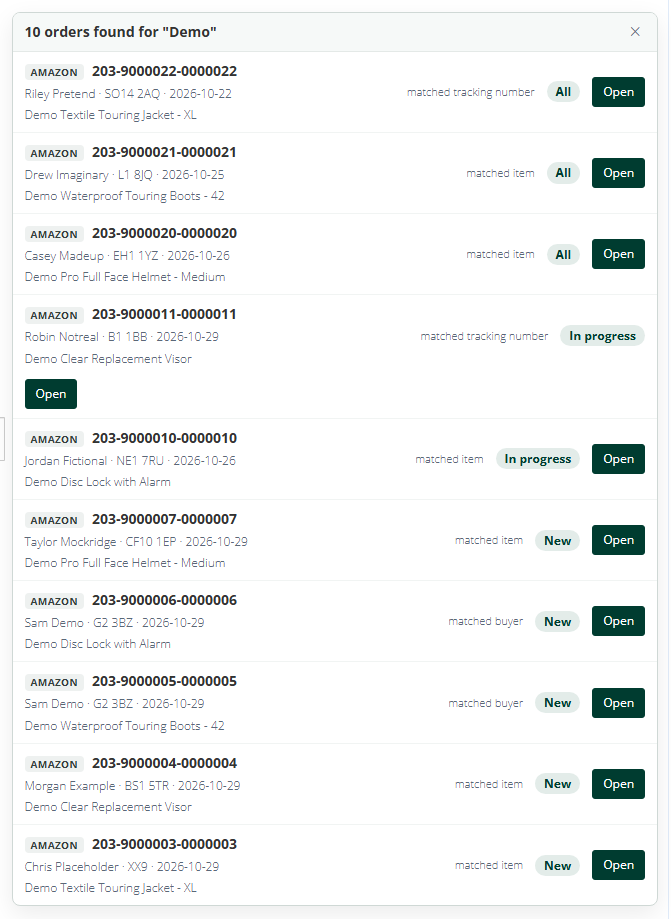
Find any order by order number, buyer, postcode, tracking number or item title - Stock Konnect opens the right tab.
One search across New, In progress and All, with a button to open each order.
What's new
Search by anything: order number, buyer name, postcode, tracking number or item title.
Opens the right tab: Stock Konnect finds which tab the order is in and takes you there.
Where to find it
Orders > Search all tabs box
9:20 amNewOrders
Needs attention: every order that would miss today's dispatch
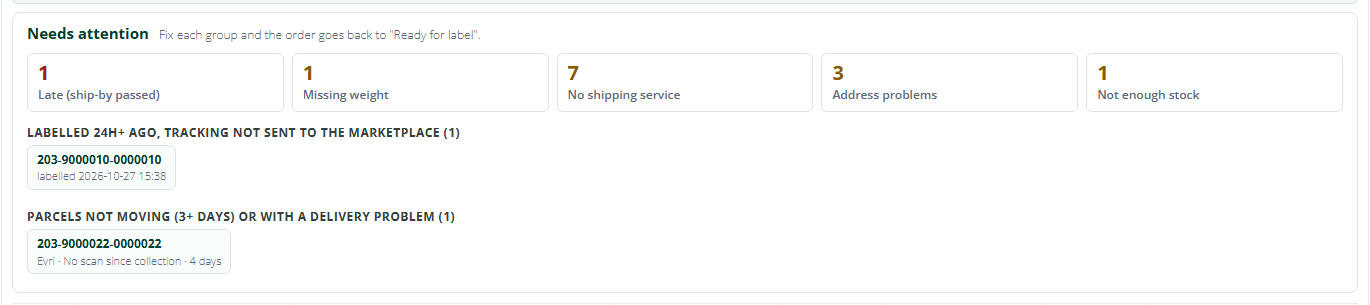
One tab lists every order that would miss today's dispatch - late, no weight, no service, address or stock problems - grouped by what to fix.
Needs attention groups the orders to fix before today's dispatch.
What's new
Late orders first: orders past their ship-by time sit at the top.
Grouped by what to fix: no weight, no shipping service, address problems and stock problems each have their own group.
Labelled but not sent: labels bought more than a day ago that have not been dispatched yet.
Parcels not moving: shipped parcels with no new courier scan.
Where to find it
Orders > Needs attention tab
6:05 pmNewOrders
Ship-by countdown on every Amazon and eBay order
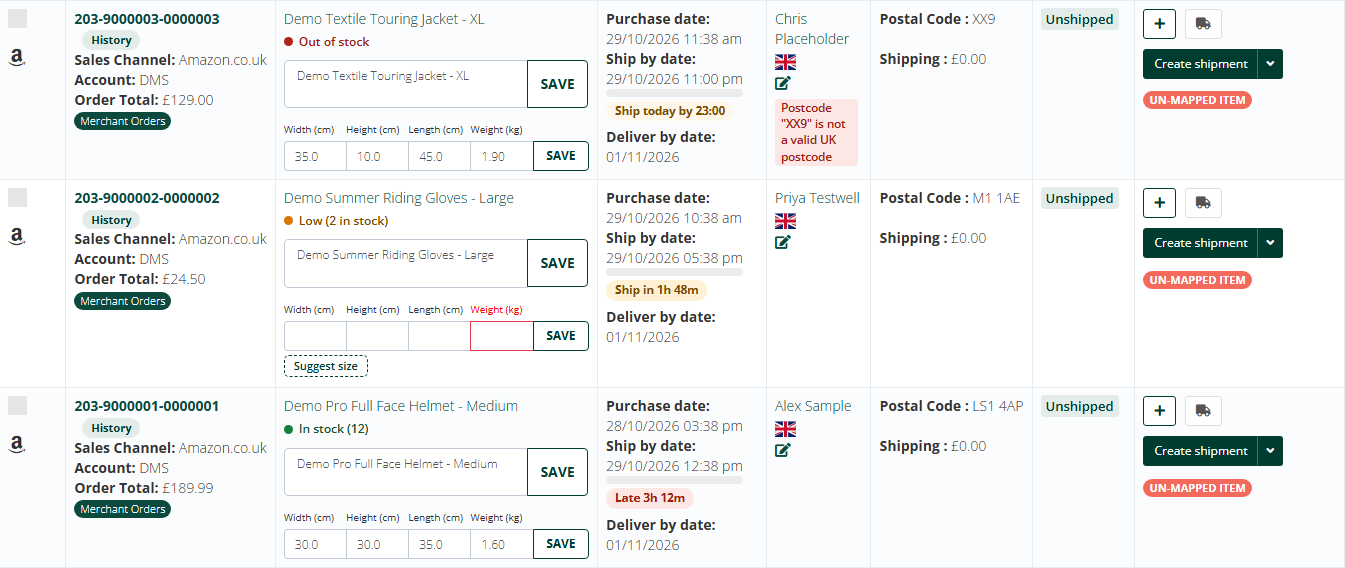
Each Amazon and eBay order shows how long you have left to ship it - Late, Ship in 2h, Ship today, Tomorrow.
Late, Ship in 1h 56m, Ship today - straight from the marketplace ship-by date.
What's new
Clear labels: Late, Ship in 2h, Ship today, Tomorrow.
Taken from the marketplace: the ship-by date Amazon and eBay give for each order.
Spot risks early: late and same-day orders stand out in the list.
Where to find it
Orders > each Amazon or eBay order row
5:15 pmNewOrders
Today's work at a glance, at the top of the orders page
A row of numbers - new, needs weight, ready for label, labelled, shipped today. Click one to see only those orders. The dispatch tiles are clickable too.
Today's work and Dispatch pressure at the top of the orders page. Click any number to see those orders.
What's new
One row of numbers: new, needs a weight, ready for a label, labelled and shipped today.
Click a number: the list shows only those orders.
Same dates as your list: the numbers follow the date range you picked, so they match the tabs.
Dispatch tiles are clickable too: jump straight to the orders behind each tile.
Where to find it
Orders > top of the page
12:45 pmNewShipping
Parcel tracking on the orders page
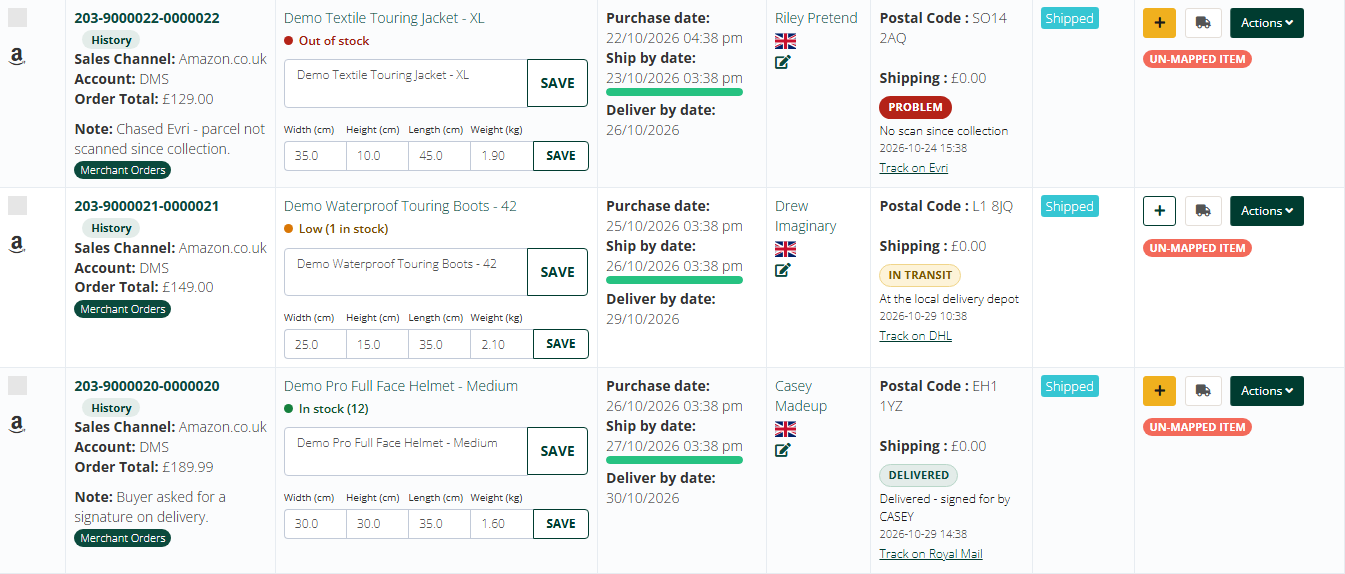
Shipped orders show Delivered, In transit or Problem, with a one-click link to the courier tracking page for Royal Mail, DHL and Evri.
Delivered, In transit and Problem on shipped orders, with a link to the courier.
What's new
Status on every shipped order: Delivered, In transit or Problem.
One click to the courier: open the Royal Mail, DHL or Evri tracking page for the parcel.
Check now: refresh the tracking status whenever you need to.
Where to find it
Orders > shipped orders
9:40 amNewOrders
Readiness line for ticked orders
Tick orders and a line tells you which ones still need a weight or a shipping service before you print labels.
Ticked orders: which still need a weight or a shipping service.
What's new
Before you print: tick orders and see which ones still need a weight or a shipping service.
Fix and go: sort out the few that are missing something, then print the rest.
Where to find it
Orders > tick one or more orders
4:30 pmNewOrders
Suggest a parcel size from similar products
Missing a weight? One click suggests the size from similar products. You check it and press Save as usual.
No weight yet? Suggest size fills it from similar products.
What's new
One click: when an order has no weight, Stock Konnect suggests one from similar products you have shipped.
You stay in control: check the suggestion and press Save as usual.
Where to find it
Orders > an order with no weight
3:20 pmFixedOrders
Amazon orders stuck as not shipped
Amazon orders that were shipped but still showed as waiting have been corrected, and new ones no longer get stuck.
12:50 pmImprovedOrders
Orders page in the new colours
The orders page now uses the Stock Konnect colours, with clearer buttons and easier-to-read rows.
5:35 pmSecurityLogin
Sign-in security strengthened
Sign-in and sign-up now have stronger protection against password guessing and automated sign-ups.
10:05 amNewLogin
New sign-in and sign-up pages
Faster sign-in and a simpler sign-up, with optional two-step codes and a clearer password reset.
What's new
Faster sign-in: a cleaner page that works well on phones.
Simpler sign-up: fewer steps to start your free trial.
Two-step codes: optional extra protection for your account.
Clearer password reset: a secure link that expires.
11:25 amNewNavigation
A cleaner menu in the Stock Konnect colours
A new header, menu and footer on every page, easier to scan and to use on smaller screens.
3:10 pmNewDashboard
Control room dashboard
See what needs attention first: dispatches not confirmed, dead links, orders to pick, stock running out.
What's new
What needs you first: dispatches not confirmed, broken listing links, orders to pick and stock running out.
Click through: every number opens the orders or listings behind it.
4:40 pmImprovedShopify
Shopify stock sync repairs itself
Broken Shopify stock links are now found and repaired automatically, so stock keeps flowing to your store.
What's new
Finds broken links: Shopify stock links that stopped working are found every day.
Repairs them: matched again by SKU, so stock keeps flowing to your store without you doing anything.